 Alwazour Technical
Alwazour Technical
Alwazour Technical
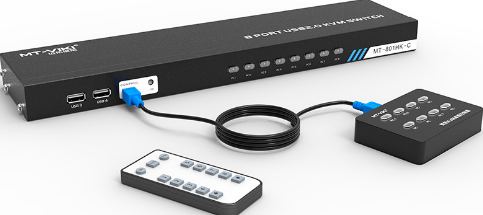
KVM-HDMI-8
Controls 8 computers with one keyboard, mouse and monitor over HDMI and USB, switching between them with a button or remote instead of unplugging cables by hand.
Real reason KVM switching needs more than a mechanical relay: each HDMI port's DDC/EDID line lets the switch tell the active computer what display is really connected (resolution, refresh rate), and the USB-A side carries real keyboard/mouse HID data alongside the video switch -- both channels switch together.
Hover any port to see what it does and what connects to it.
From the published standard
A KVM switch connects several computers to one monitor, keyboard and mouse, and flips control between them with a button or remote. When you switch, the inactive computer keeps running in the background with no display attached — it is not turned off, only unselected.
This information comes from published sources about this type of product, not from the supplier.
| Device | KVM switch |
|---|---|
| Ports | 8 |
| Connectors | HDMI / USB-A |
Ask on WhatsApp, and get an answer from a team that actually knows the stock.
Request a quote on WhatsApp