Alwazour Technical
AR Request a quote on WhatsApp
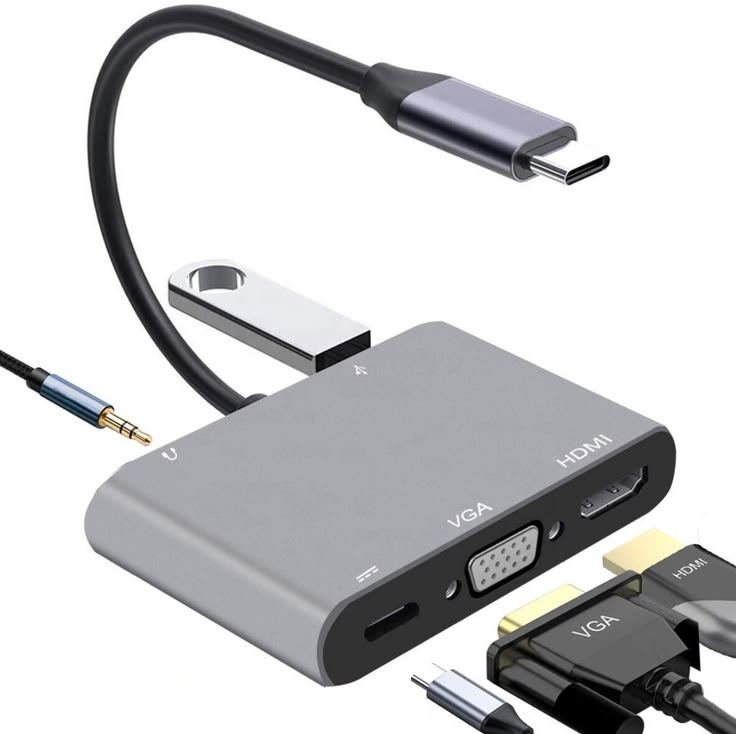
USB-C Multiport Adapter (HDMI, VGA, USB 3.0, PD)
In stock

USB-C Multiport Adapter (HDMI, VGA, USB 3.0, PD)

CVT-USBC-4IN1

One USB-C port becomes HDMI, VGA, USB 3.0 and pass-through charging.

Type
Converter
Connectors
USB-C / HDMI / VGA / USB-A
In-depth technical details

Needs power from the supplied USB cable when driving larger displays. USB-C has 24 pins, and its real distinguishing feature is symmetry: 4 VBUS + 4 GND pins (for reversibility and higher current), 2 CC pins (only one active at a time -- the actual mechanism behind plugging in either way, and how Power Delivery negotiation happens), plus SuperSpeed differential pairs that can carry USB 3.x data or, in Alt Mode, DisplayPort video. HDMI Type-A carries 19 pins: TMDS pairs for the video/audio signal itself, plus control lines -- CEC (single remote controlling multiple devices), DDC/+5V (the EDID handshake that lets the source learn the display's supported resolutions), and HPD (Hot Plug Detect, how the source knows a display is actually connected). VGA (DE-15) carries 3 analog color signals (R/G/B), separate HSync/VSync timing lines, and a real DDC (I2C) channel on pins 12/15 -- the same 'source reads the display's real capabilities' concept as HDMI's DDC, just an older technology. USB-A carries just 4 pins: VBUS (+5V power), a D+/D- differential data pair, and GND -- the simplest USB pinout, with no reversibility and no Power Delivery negotiation lines.

End A

USB Type-C

  • 01 24 pins, reversible The pins are laid out with rotational symmetry, so either way up gives the same connection. That is why there is no wrong way round.
  • 02 CC negotiation lines The two ends use these to agree voltage and current before any power flows — what makes 100 W charging safe.
  • 03 Oval shell The rounded oval spreads insertion stress and survives being plugged in far more times than older shapes.
  • 04 Strain-relief boot Stops the wires flexing where they leave the plug — the exact point most cables fail.
  • 05 Outer jacket The outer sheath protecting the conductors inside from abrasion and moisture.

Technical illustration, not a photo of the actual product

CEC DDC HPD

End B

HDMI Type-A

  • 01 19 pins Three differential TMDS pairs carry picture and sound, a fourth carries the clock, and the rest are named-function pins.
  • 02 CEC A single wire that lets one remote control multiple connected devices, e.g. a TV and a receiver.
  • 03 DDC / +5V The EDID handshake -- how the source learns which resolutions the display supports.
  • 04 HPD Hot Plug Detect -- how the source knows a display is connected at all.
  • 05 Metal shell The shell is grounded and wraps the pins, keeping interference out of a very high-frequency signal.
  • 06 Strain-relief boot Stops the wires flexing where they leave the plug — the exact point most cables fail.
  • 07 Outer jacket The outer sheath protecting the conductors inside from abrasion and moisture.

Technical illustration, not a photo of the actual product

DDC

End C

VGA (HD-15)

  • 01 15 pins Three analogue colour signals (red, green, blue) plus horizontal and vertical sync, each on its own pin.
  • 02 DDC (I²C) The EDID handshake -- how the source learns which resolutions the display supports.
  • 03 D-shaped shell The D profile only fits one way round, so the plug cannot be inserted upside-down and bend its pins.
  • 04 Thumbscrews Hand-tightened to hold the plug home. A loose one is why a picture flickers, or loses one colour channel.
  • 05 Strain-relief boot Stops the wires flexing where they leave the plug — the exact point most cables fail.
  • 06 Outer jacket The outer sheath protecting the conductors inside from abrasion and moisture.

Technical illustration, not a photo of the actual product

VBUS D+/D- GND

End D

USB Type-A

  • 01 VBUS +5V power. Slightly longer than the other pins so it mates first and breaks last.
  • 02 D+ / D− The differential data pair -- the same signal inverted on each wire, so noise cancels at the receiver.
  • 03 GND The common ground -- the voltage reference every other signal is measured against.
  • 04 Metal shell The plastic tongue sits in one half of the shell only, which is why the plug goes in one way up.
  • 05 Strain-relief boot Stops the wires flexing where they leave the plug — the exact point most cables fail.
  • 06 Outer jacket The outer sheath protecting the conductors inside from abrasion and moisture.

Technical illustration, not a photo of the actual product

From the published standard

How it works

One USB-C port carries several signals at once via Alt Mode -- some of the physical lanes switch to carrying DisplayPort video, regenerated here as HDMI or VGA output instead of ordinary USB data, while another lane still carries USB Power Delivery pass-through charging and another carries real USB data. Whether video actually works depends on the source computer's specific USB-C port supporting Alt Mode -- not every USB-C port does.

Function
USB-C Alt Mode video (as HDMI/VGA) + USB 3.0 data + PD pass-through charging
Requirement
Source USB-C port must support DisplayPort Alt Mode

This information comes from published sources about this type of product, not from the supplier.

Applications

Technical specifications

TypeConverter
ConnectorsUSB-C / HDMI / VGA / USB-A

Not sure this is the right part?

Ask on WhatsApp, and get an answer from a team that actually knows the stock.

Request a quote on WhatsApp
In stock Request a quote on WhatsApp
WhatsApp

Type to search